A very common request on status pages: a table of Jira Epics with a status column that colors itself – green for on track, amber for at risk, red for off track – without anyone manually recoloring cells every week. Doing this with a plain macro that just lists Jira fields is awkward, because listing data and coloring it are two different jobs. CelesteCS Conditions is built specifically to be the second half of that job, working over any table already on the page, including one built from Jira data.
On Confluence Cloud: this same approach works end to end with CelesteCS Reporting for Confluence Cloud, CelesteCS Math for Confluence Cloud, and CelesteCS Conditional Rule Cloud / Conditional Rules Manager Cloud.
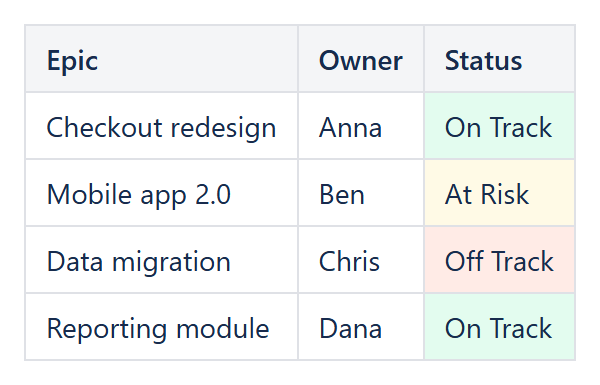
The approach
- Get the Epic data onto the page as a normal table. You can build this table with CelesteCS Reporting’s Table View macro (a Jira Data Provider plus a Table Item per column you want, e.g. Epic name and a ‘RAG’ text field), or with CelesteCS Math’s JIRAISSUEFIELDVALUES functions if you only need a couple of columns.
- Wrap that table in a Conditional Rules Manager macro.
- Add one Conditional Rule macro per color, each checking the status column against the text your Jira workflow actually uses.
Example configuration
Three Conditional Rule macros inside the same Conditional Rules Manager, each with Applies to set to the status column (e.g. Table1.C:C):
- Rule condition: Element text contains, Value 1:
On Track, Background color:highlight-green - Rule condition: Element text contains, Value 1:
At Risk, Background color:highlight-yellow - Rule condition: Element text contains, Value 1:
Off Track, Background color:highlight-red
Because the rules read the cell’s current text every time the page renders, and the table itself is refreshed from Jira on every view, the colors stay correct without anyone touching the page – exactly the “pull from Jira, not manually maintained” behavior that is usually the whole point of asking for this.
Coloring by a number instead of text
If your workflow tracks a numeric health score rather than a status word, use a formula-based rule instead: Rule condition: Formula result value is true, with a Value 1 such as A1 < 50 to catch the “red” band, another rule for the amber band, and so on. Formula-based rules have the full power of CelesteCS Math’s function library available, so bands can be as simple or as elaborate as the underlying metric needs.
Prefer a gradient instead of three fixed bands?
If red/amber/green is really a continuous scale rather than three buckets, a Conditional 3-Color Scale macro does the same job with a smooth gradient instead of hard cut-offs – see the next article in this series for worked examples.
Try it in your own Confluence: CelesteCS Conditions for Confluence on the Atlassian Marketplace – free trial for Cloud and Data Center. This example also uses CelesteCS Math for Confluence and CelesteCS Reporting for Confluence.
Conditions saves you time? A review on the Marketplace helps other teams find it.