The Conditional Rule macro’s condition list has grown well beyond the original “equal to / greater than / contains” comparisons. This article walks through the newer condition types – ranking, duplicates, and dates – with the kind of table each one is meant for.
On Confluence Cloud: insert this as CelesteCS Conditional Rule Cloud – every condition type described below, including top/bottom N, duplicates and the date conditions, is available on Cloud too.
Ranking within a range: top N and bottom N
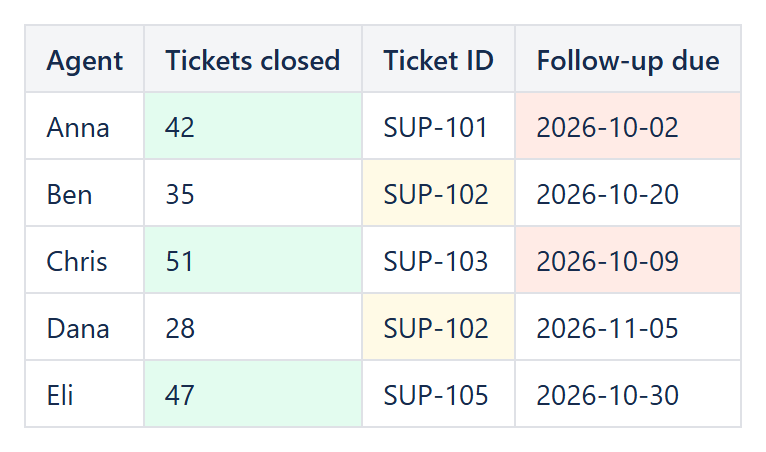
Element value is in top N and Element value is in bottom N highlight the N largest or N smallest numeric values in the range the rule applies to, with Value 1 holding N. On a leaderboard-style table (points, revenue, tickets closed), setting Value 1 = 3 with in top N highlights the three best rows with no need to know in advance what the top values actually are – add a row, remove a row, change a number, and the highlighted set updates itself. As in Excel, ties at the boundary can highlight more than N cells rather than arbitrarily dropping one.
Above and below average
Element value is above average / below average compare each cell to the mean of every numeric value in the same evaluated range – useful for spotting outliers on either side without hard-coding a threshold that has to be revisited every quarter.
Finding repeats: duplicate and unique
Element value is a duplicate highlights every cell whose (trimmed, case-insensitive) text value occurs more than once in the range; Element value is unique highlights the opposite – values that occur exactly once. This is a quick way to flag repeated ticket numbers, email addresses or SKUs pasted into a table by hand, or conversely to find the one row in a list that doesn’t match a pattern everything else follows.
Date-driven highlighting
A full family of date conditions is available – is before, is after, is today, is overdue, is overdue by more than N days, is yesterday, is in the next N days, is in the last N days – all of them reading cells (and, where relevant, Value 1) as ISO-8601 dates (YYYY-MM-DD), with Value 1 also accepting the literal word Today for before/after. A due-date column with a rule set to is overdue and a red background needs no maintenance at all: what counts as overdue moves forward with the calendar automatically. For SLA tracking, is overdue by more than N days (Value 1 = 3, for example) flags only the items that are past due by more than the allowed grace period. Pairing is in the next N days (Value 1 = 7) with an amber background gives you an “upcoming” warning band a week ahead of the deadline, next to the overdue rule for anything already late.
Flagging unusually long or short text
Element text length is greater than / is less than compare the character count of a cell’s text against Value 1 – handy for catching placeholder text left in a “Notes” column (too short) or a description field that has clearly turned into an essay (too long) during a review pass.
All of these conditions live in the same Conditional Rule macro as the classic comparisons, so an existing Conditional Rules Manager set-up can mix and match them freely – a top-N rule and an overdue-date rule can sit side by side over the same table, each formatting a different column.
Try it in your own Confluence: CelesteCS Conditions for Confluence on the Atlassian Marketplace – free trial for Cloud and Data Center.
Conditions saves you time? A review on the Marketplace helps other teams find it.