Confluence’s built-in Jira Issues macro is the obvious first choice for putting Jira data on a page, and it works well right up until the point where the fixed one-issue-per-row table stops matching what stakeholders actually need to see: a computed column, a manually-added note next to an automatically-pulled field, a footer total, or a row highlighted because it needs attention. At that point the macro’s built-in column picker runs out of options. CelesteCS Reporting is built around exactly this gap: every column is its own formula, evaluated against the real JSON data behind each issue.
Works the same way on Confluence Cloud – Reporting for Confluence Cloud uses the exact same macro names and formula syntax as the examples below, so everything here applies directly if you’re on Cloud.
The building blocks
- Reporting Jira Data Provider – runs a JQL query and returns the matching issues as data, one
CurrentItemper row. - Reporting Table View – the table itself, containing the data provider and one Reporting Table Item macro per column.
Example: a table with a computed column and a manual note
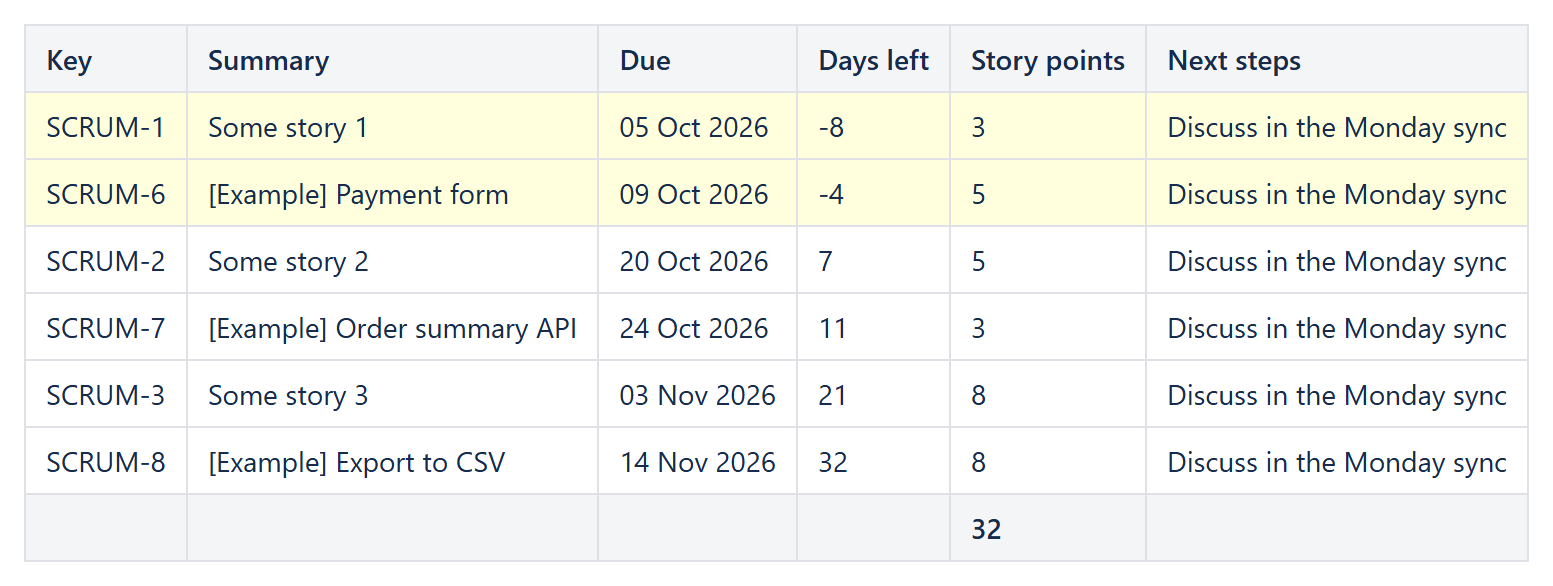
A Reporting Table Item’s Body content is a formula over CurrentItem, so a column showing days remaining until the due date is just:
DAYS(DATEVALUE(CurrentItem.fields.duedate); TODAY())
and a “Next steps” column that stakeholders can freely edit, unrelated to any Jira field, is simply a Table Item with Body content type: Text only and its own plain text – sitting in the same row as the computed columns, something a fixed one-issue-per-row macro table has no way to offer.
Example: a footer total
Set Footer aggregate: Sum on a story-points column and the column’s footer cell fills itself in with the total of every row’s value – no separate formula, and it recalculates the moment the underlying JQL query returns a different set of issues.
Example: highlighting rows that need attention
A Table Item’s Highlight when formula – for example AND(NOT(ISBLANK(CurrentItem.fields.duedate)); DATEVALUE(CurrentItem.fields.duedate) < TODAY()) – adds a CSS class to the whole row when it evaluates true, so an overdue issue stands out without a separate Conditions macro. (For richer color rules – gradients, data bars, RAG bands – wrap the finished table in a Conditional Rules Manager instead; the two plug-ins are designed to be layered.)
Example: showing only the issues that matter
The data provider’s Filter formula can reference AllItems as well as CurrentItem, so a filter can compare each issue against the whole result set – for example CurrentItem.fields.timeestimate > Average(AllItems.fields.timeestimate) keeps only the issues estimated above the average, computed live from the same JQL query rather than a number someone has to update by hand. The Table View’s own Sort, Distinct by and Limit parameters (see our article on that specifically) take care of ordering and top-N style trimming on top of the filter.
Because every column is an independent formula, a report that started as “just the standard fields” can grow a computed column, a manual note, a total and a highlight rule one at a time, without ever hitting a wall the way a fixed-column macro eventually does.
Try it in your own Confluence: CelesteCS Reporting for Confluence on the Atlassian Marketplace – free trial for Cloud and Data Center.
Reporting saves you time? A review on the Marketplace helps other teams find it.